Time and Attendance Software Comparison 2026: Providers & Criteria
The right time and attendance software depends mainly on three factors: team size, working time models and payroll. For teams of up to around 50 employees without shift work, a dedicated time tracking tool is often enough. Once you add shifts, premium pay, multiple locations or a DATEV integration, HR software with built-in time and attendance usually makes more financial sense. In this comparison, you’ll find 5 providers across both categories, the five key selection criteria and a realistic cost overview.
Time and attendance software comparison: providers, criteria and costs
Key takeaways
- Two categories: Standalone tools record working hours quickly and cheaply. All-in-one HR software connects time data with absences, employee master data and payroll.
- Five criteria matter: team size, industry and collective agreement, recording methods, feature depth including integrations, and total cost.
- Costs: Cloud solutions cost roughly €1.50 to €9.50 per user per month, plus setup and terminals where applicable.
- Check the DATEV integration: It saves the most time at month-end close, but not every provider includes it.
What is time and attendance software?
Time and attendance software records, manages and documents every working-time process in a company on a single platform. It goes beyond basic time tracking (clocking in, clocking out, breaks) and also covers absences, flexitime and overtime accounts, shift planning and the preparation of premium pay for payroll. According to the German Federal Labour Court (Bundesarbeitsgericht, decision of 13 September 2022, 1 ABR 22/21), employers in Germany are required to record working time systematically.
The 5 criteria we use for comparison
| Criterion | Key question | What to look for |
|---|---|---|
| 1. Team size & scalability | Will the system work today – and with twice as many employees? | Up to approx. 50: easy to use, quick to set up. 50+: multi-level approvals, roles and permissions, multiple locations or entities. |
| 2. Industry & collective agreements | Can we map our working time models and premium pay? | Shift models, rotating rotas, night, Sunday and public holiday premiums; rule sets for collective agreements (e.g. TVöD, metal and electrical industry) or works agreements. |
| 3. Recording methods | Where and how do employees clock in? | For example: web for office staff, an app with offline mode and geofencing for field staff and construction sites, terminals for production and warehouses. |
| 4. Feature depth & integrations | Do we only need time tracking, or full time and attendance? | Basics: time entries, automatic break deduction, balances. Advanced: shift planning, absences, employee files. Integrations: DATEV LODAS or Lohn und Gehalt, open API. |
| 5. Total cost | What will the system cost over 3 years? | Licence per user per month, setup, training, terminals, add-on modules (e.g. DATEV export). |
Time and attendance software compared: 5 providers
Transparency note: HRlab is itself a provider of HR software with time and attendance features. All information on other providers comes from their public websites, as of October 2026. Prices and features are subject to change.
| Provider | Category | Target size | Recording | Shift planning | DATEV integration(s) | Price from (per user/month), billed annually | Free trial |
|---|---|---|---|---|---|---|---|
| HRlab | All-in-one HR software | 50–2,000 employees | Mobile app, desktop (web), terminal | Yes | Yes | €8 | Yes, free for 28 days |
| Personio | All-in-one HR software | Up to 2,000 employees | Desktop, mobile app, terminal or the Personio entrance app | Via integrations with specialist third-party providers | Yes | Not currently published as a fixed price – see the pricing page | Yes, free for 14 days |
| HRWorks | All-in-one HR software | Designed for small and medium-sized enterprises (SMEs) | Configurable per employee (mobile, PC only, kiosk) | Yes | Yes | Not currently published as a fixed price – see the pricing page | Yes, after a personal consultation |
| Clockodo | Standalone | No specific information currently available | Browser, desktop app, mobile app, terminal | No | Yes | €9.50 | Yes, free for 14 days |
| Crewmeister | Standalone | 1–50 employees | Mobile, PC, terminal | Yes | Yes | €1.50 | Yes, free for 14 days |
Standalone tool or all-in-one HR software?
Choosing the category is the first decision – even before choosing a provider. It depends on whether you only want to record working hours or connect time, absences and payroll in one system.
| Criterion | Standalone tool | All-in-one HR software |
|---|---|---|
| Typical size | 5–50 employees | From approx. 30 to over 1,000 employees |
| Typical use | Trades, construction, hospitality, agencies | Mixed SMEs, administration, production with shifts |
| Recording | App with GPS, web time clock, tablet kiosk | Web platform, employee app with self-service, terminals |
| Features | Clock in, clock out, breaks, project time, simple leave requests | Full time and attendance with shift planning, working time accounts, employee files, workflows |
| Payroll | CSV or Excel export; DATEV depending on provider, sometimes as an add-on | Direct payroll integration (e.g. DATEV) |
| Data management | Master data is also maintained in other systems | All HR and time data in one place |
| Cost type | Standalone tool | All-in-one HR software |
|---|---|---|
| Licence per user/month | Approx. €1.50–€9.50 (see examples above) | From approx. €8.00 (see examples above) |
| Setup | Often none | Possibly one-off onboarding costs, depending on the package – check with the provider |
| Terminals | Optional, one-off cost per device | Optional, one-off cost per device |
| Add-on modules | Often a choice of add-ons | Often a choice of add-ons |
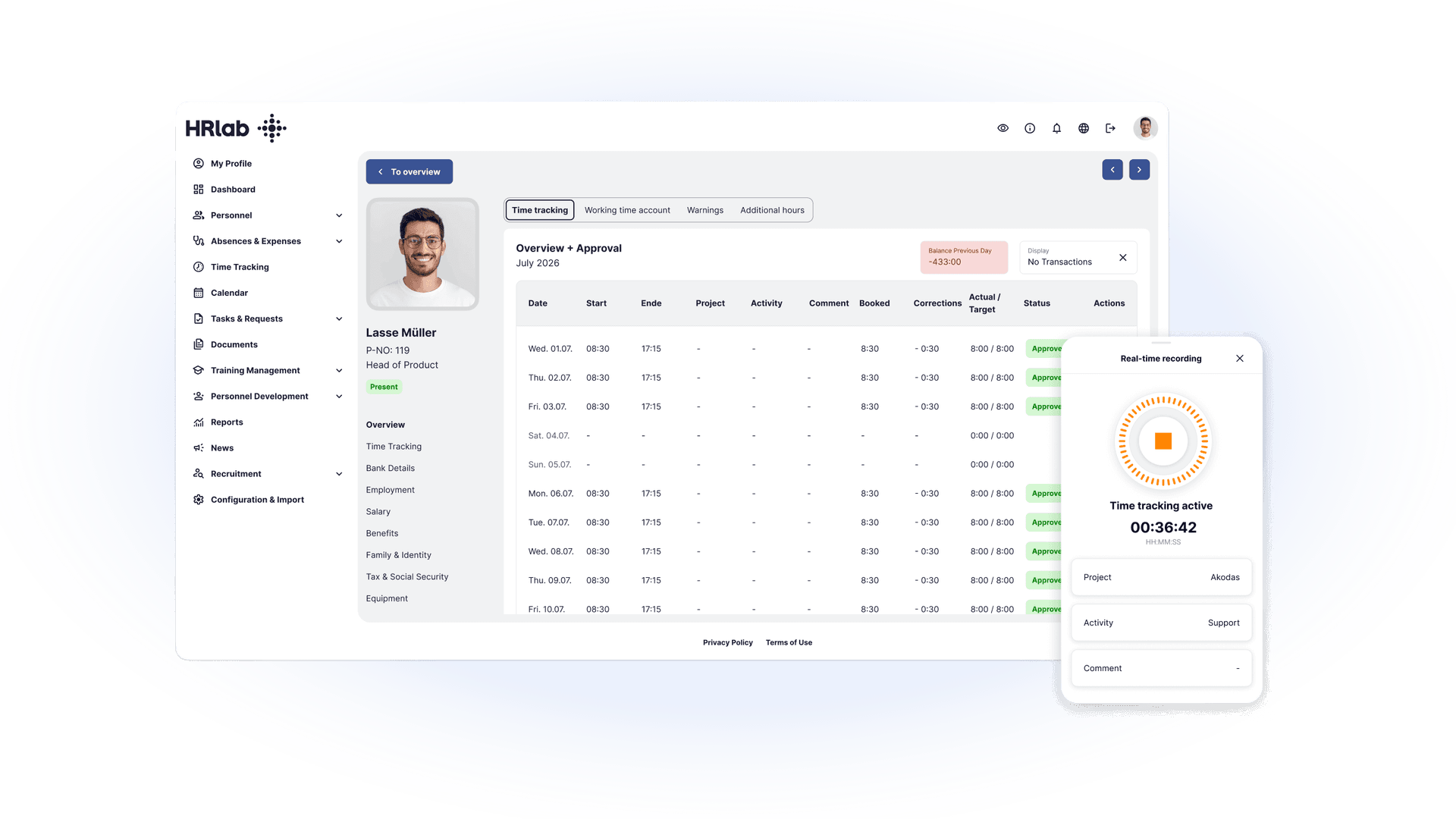
Example calculation with HRlab: 80 employees × €8 = €640 in licence costs per month, billed annually. Important: weigh this against the time saved at month-end close. With an HR software solution, you benefit from integrated core HR processes – even a few hours less manual data transfer per month makes a big difference. You’ll find all further details on the HRlab pricing page.
| Criterion | Key question | What to look for |
|---|---|---|
| 1. Team size & scalability | Will the system work today – and with twice as many employees? | Up to approx. 50: easy to use with no training needed, quick to set up. 50+: multi-level approvals, roles and permissions, multiple locations or entities, mixed teams (administration, production, field staff). |
| 2. Industry & collective agreements | Can we map our working time models and premium pay? | Agencies and service providers: project time tracking and cost unit accounting. Production, logistics and care: shift models, rotating rotas, automatic night, Sunday and public holiday premiums; rule sets for collective agreements (e.g. TVöD, metal and electrical industry) or works agreements. |
| 3. Recording methods | Where and how do employees clock in? | Web for office staff; mobile app (iOS/Android) with offline mode and geofencing for field staff and construction sites; terminals with RFID chips or transponders for production, warehouses and trades. |
| 4. Feature depth & integrations | Do we only need time tracking, or full time and attendance? | Basics: time entries, automatic break deduction, leave and sickness management, balances. Advanced: shift and workforce planning, skills matrices, project controlling, digital employee files. Integrations: DATEV LODAS or Lohn und Gehalt, open API – avoids errors when transferring wage types. |
| 5. Total cost | What will the system cost over 3 years? | Licence per active user per month, one-off setup and training, terminals, add-on modules (e.g. DATEV export). |