
Managing Working Time Accounts: Rules, Setup & Software
A working time account is only as effective as its governing rules. To prevent disputes over deficit hours, public holidays, or sick leave, companies need clear, fair, and legally compliant agreements developed with active works council involvement. The key advantage: a well-managed working time account delivers operational flexibility for employers and planning certainty for employees. This article explains how to implement and maintain an effective system.
Key Takeaways
- Working time accounts must be maintained in a clear, accurate, and verifiable manner.
- Sick leave, public holidays, and paid time off (PTO) must never result in deficit hours (negative balances).
- Positive hour balances cannot be arbitrarily reduced or forfeited; clear contractual or shop agreement terms are required for payout or time-off in lieu.
- Employees hold the legal right to inspect their working time account balances at any time.
What is a Working Time Account? (Definition for HR & Management)
A working time account accurately records the variance between an employee's contractually agreed target hours and actual hours worked. For HR leaders, implementing a WTA ensures compliant documentation under the German Working Hours Act (ArbZG), safeguarding the organization against compliance fines during labor audits.
System Selection: Integrated HR Solution vs. Standalone Tools
To manage time accounts effectively, organizations require a transparent tracking mechanism—whether via electronic time tracking software, DATEV-compatible solutions, or digital terminals. Employees must have direct visibility into their current balances, while HR managers need tools to monitor compliance and approve manual edits. Key requirements include:
- Employee Self-Service (ESS): Mobile (app) and desktop access allows staff to check their balance independently, significantly reducing routine HR inquiries.
- Automated Exception Logging: The system should proactively alert HR to missing entries, unapproved overtime, or rest-break violations.
- Unified HR Ecosystem: An integrated HR software suite connects time data directly with employee master data, leave management, and payroll—eliminating data silos and manual export errors.
How to Structure a Working Time Account: Blueprint & Setup
While statutory regulations allow structural flexibility, a working time account must clearly track total hours worked, accrued overtime, deducted break times, and the net monthly balance.
| Regulatory Focus Area | Example / Operational Detail | Statutory & Legal Basis |
|---|---|---|
| Monthly Target Hours | 160 hours for a standard 40-hour work week | Employment Contract / Collective Bargaining Agreement |
| Balance Limits | Upper/lower limits for positive and negative hours (e.g., ±40 hours) | Works Council Agreement / Sec. 87 BetrVG |
| Settlement Period | Defined timeframe to balance the account (e.g., 12 months) | German Working Hours Act (ArbZG) / Works Agreement |
| Zero Baseline (Nulllinie) | Fixed deadline or threshold where the account balance must reset | Works Council Agreement (Betriebsvereinbarung) |
| Vacation & Public Holidays | Credit of full regular target hours (no negative deductions) | Continued Remuneration Act (EFZG) |
| Sick Leave & Medical Certificates | Full pay continuation applies (no deficit hours allowed) | Sec. 3 EntgFG (Continued Remuneration Act) |
Use Case: Managing Working Time Accounts with HRlab
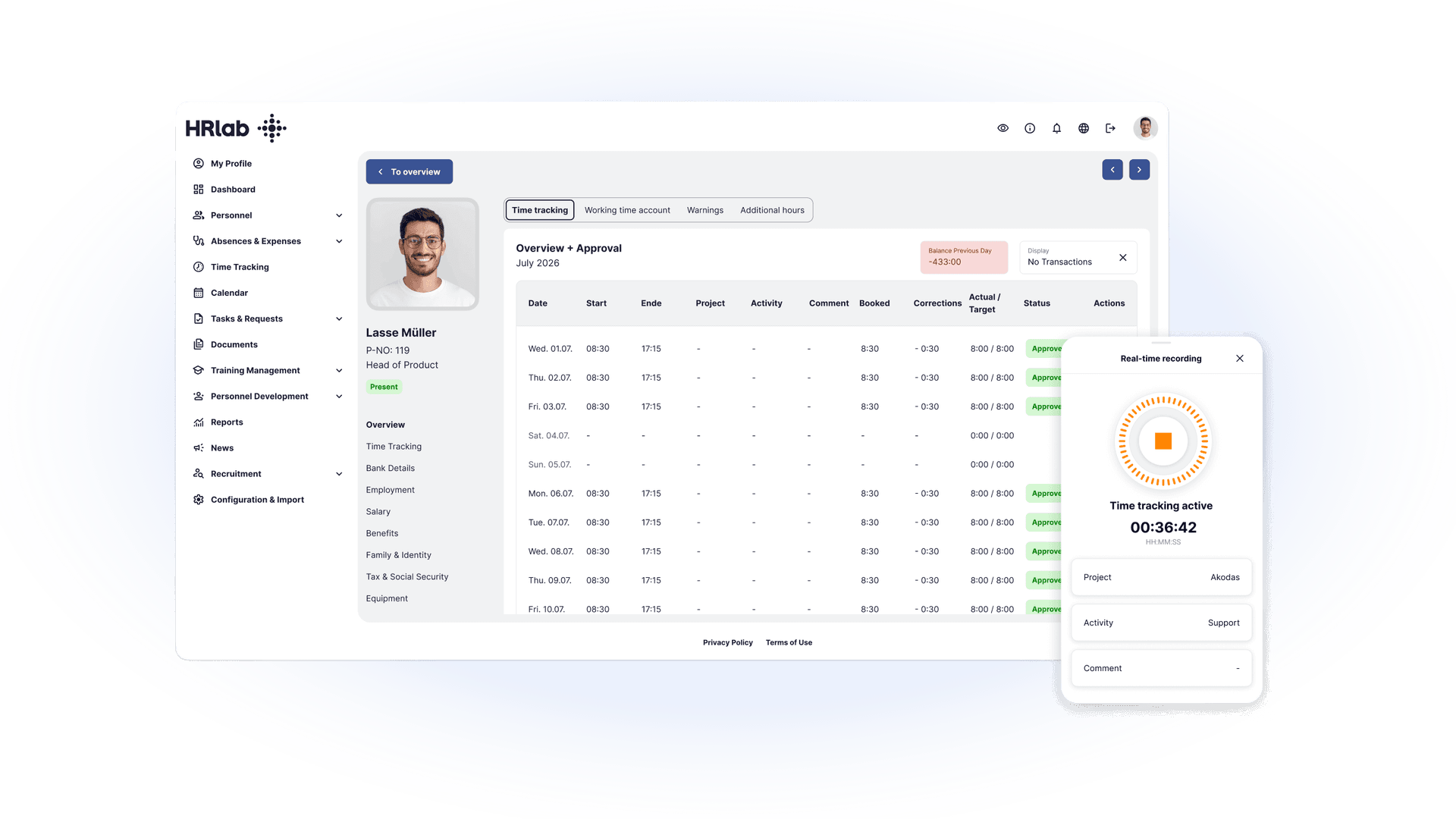
With HRlab’s cloud-based time tracking and account management system, HR teams manage flexible working models centrally, securely, and transparently. HR professionals, team leads, and staff gain real-time access to current balances, leave requests, and automated calculations:
- Automated Synchronization: Time entries flow directly into the system. Overtime, premium pay, absences (vacation, sick leave), and statutory rest breaks are automatically evaluated and applied.
- Seamless Payroll Interfaces: Time tracking data transfers directly to DATEV and standard payroll systems. Automated master and transaction data exports eliminate manual entry errors.
- Data Security & GDPR Compliance: Hosted in high-security German data centers (Kempten & Berlin), fully compliant with EU GDPR standards.
- Integrated Project Time Tracking: Flexible real-time or retrospective assignment of working hours to specific projects and client tasks for accurate cost accounting.
Evaluating Working Time Accounts Through Integrated Analytics
HRlab provides comprehensive reporting features for workforce time tracking. All data can be analyzed via the web interface or exported to Excel for payroll processing and financial controlling:
- Target vs. Actual Hours: Complete overview of evaluated working hours, target schedules, and effective variances.
- Absences & Holidays: Automated crediting for vacation days, planned leave, and national public holidays.
- Differentiated Sick Leave Rates: Detailed breakdown distinguishing between illness periods impacting health metrics and non-relevant medical leave, including monthly and cumulative sickness rates.
- Adjustments & Balances: Transparent reporting on manual break adjustments, payouts, balance transfers, and opening/closing period balances (including preliminary balances for pending approvals).
System Architecture: Integrated HR Software vs. Standalone Tools
Managing working time accounts requires a transparent tracking system—whether through mobile time tracking apps, terminals, or DATEV-compatible software. Modern HR architectures rely on integrated systems rather than isolated time-clock tools:
- Employee Self-Service (ESS): Real-time mobile and desktop visibility empowers employees to monitor their balance, reducing routine HR inquiries.
- Automated Compliance Audits: Proactive system alerts notify HR when statutory rest breaks are missed or daily maximum hour limits (ArbZG) are exceeded.
- Direct Payroll Synchronization: Connecting time tracking directly to employee master data, leave management, and payroll exports eliminates manual data entry errors.
Managing Working Time Accounts: Overtime, Deficit Hours & Compliance
Whether via hardware terminals, digital timesheets, or mobile time tracking apps: seamless time tracking forms the foundation of every working time account. It documents start times, end times, and statutory rest breaks in full compliance with the German Working Hours Act (ArbZG). If time entries are missing or adjusted manually, changes must be processed transparently and logged in an audit-proof manner.
Calculating Working Time Account Balances: Overtime vs. Deficit Hours
The account balance represents the net position of an employee's working time account at a given cutoff date.
- Positive Balances / Overtime: Occur when actual hours worked exceed the contractually agreed target hours. Employers may only mandate overtime if explicitly authorized by an employment contract, collective bargaining agreement, or shop agreement (Betriebsvereinbarung).
- Deficit Hours: Represent a time debt accrued when actual hours fall short of contractual target hours. Deficit hours are legally permissible only if an explicit agreement (such as a flexible working hours or flexitime policy) permits accumulating a negative balance. Lacking this foundation, employers cannot unilaterally reduce salary or deduct deficit hours.
Statutory Protection: When Deficit Hours Are Illegal
Under statutory labor law, recording deficit hours is strictly prohibited in the following scenarios. The time account must be credited as if regular target hours were fully worked:
| Operational Scenario | Legal Basis | Time Account & Payroll Impact |
|---|---|---|
| Sick Leave & Medical Certificates | Sec. 3 EFZG (Continued Remuneration Act) | Full target-hour credit for scheduled shifts. Zero deficit hours accrued. |
| Approved Paid Leave (Vacation) | Sec. 9 BUrlG (Federal Leave Act) | Target hours are credited. If an employee falls ill during approved PTO, days are re-credited upon presenting a doctor's note. |
| Operational Downtime (Employer Default) | Sec. 615 BGB (German Civil Code) | Operational risks (system failures, lack of orders) stay with the employer. Forcing negative balances is unlawful. |
Retroactive Time Adjustments: HR Compliance & Audit Trail
When time tracking entries require manual adjustments (e.g., retroactively submitted medical certificates or forgotten clock-in entries), HR managers must observe strict compliance guidelines:
- Audit-Proof Documentation: Every manual override must be digitally logged with the date, adjustment reason, timestamp, and manager ID.
- Transparency Requirements: Employees must be notified immediately of manual adjustments (e.g., via automated Employee Self-Service notifications).
- Works Council Co-Determination: Systematic adjustments or policy updates regarding time account rules require co-determination rights under Sec. 87 BetrVG (Works Constitution Act).
- Payroll Verification: Promptly verify whether adjustments impact settlement periods, shift surcharges, or monthly payroll runs.
Best Practice
Integrated HR management platforms like HRlab eliminate manual calculation errors. Absences such as sick leave or vacation automatically cross-reference configured working hour models, crediting target hours neutrally while maintaining GDPR-compliant audit logs for all adjustments.
Practical Calculation Examples
| Category | Description | Example | Calculation / Balance Impact |
|---|---|---|---|
| Overtime | Hours worked beyond statutory or regular contract hours | 9 hr workday with an 8 hr target | +1 hr to working time account |
| Part-time Overtime | Additional hours worked in part-time, within maximum limits | Part-time 20 hrs/week, worked 24 hrs | +4 hrs to working time account |
| Flexitime Overtime | Accumulated hours within a flexible working time model | Flexible schedule with +5 hrs in a month | +5 hrs to working time account |
| Deficit Hours (Unworked) | Employee fails to meet contractually required target hours | Target: 160 hrs/month, worked 155 hrs | –5 hrs to working time account |
| Deficit Hours – Illness Exclusion | Time missed due to illness cannot be deducted (Sec. 3 EFZG) | Employee ill, 8 hr/day target schedule | 0 deficit hours, full pay continuation |
| Deficit Hours – Vacation Exclusion | Approved paid vacation is credited as target hours | 1 week vacation, 40 hr target schedule | 0 deficit hours, full PTO credit |
| Deficit Hours – Employer Default | Lack of available work or operational outage (Sec. 615 BGB) | Target: 160 hrs, only 150 hrs of work available | 0 deficit hours, operational risk with employer |
Zero Baseline and Time Credit Accrual
The zero baseline marks the reference point where a working time account is balanced—containing zero overtime or deficit hours. It serves as the primary benchmark to determine whether working time credits are being built up or reduced.
Clear thresholds regulate the maximum number of hours an employee can accumulate and define when an account balance must be settled. Typically, a settlement period is established within an employment contract, collective bargaining agreement, or shop agreement (Betriebsvereinbarung). The time account balance must return to equilibrium by the end of this specified window.
To account for accrued working time credits, organizations—particularly medium-sized and large enterprises—must establish financial provisions on their balance sheet, treating accrued hours as an outstanding financial liability.
Sick Leave and Approved Vacation Rules
A common misconception in workforce management is that sick leave generates deficit hours. Under labor law, employees who submit a certified medical certificate (Arbeitsunfähigkeitsbescheinigung - AU) cannot be penalized with deficit hours. This protection applies even if shifts are canceled on short notice.
Similarly, employers are legally prohibited from automatically reducing accrued overtime during periods of illness. Under statutory regulations, time accounts remain unchanged during certified sick leave. Where verbal agreements create ambiguity, detailed digital documentation and consultation with the works council are essential.
Employees taking approved vacation (Paid Time Off) are credited with their standard target hours for those days. Vacation days cannot be forcibly used to offset pre-existing deficit hours unless explicitly governed by a valid agreement.
Employers cannot deduct time when an employee takes leave following a period of illness or under special circumstances. Furthermore, attempting to offset flexitime credits against annual leave is unlawful without clear, written agreements.
Works Council Co-Determination and Shop Agreements
Under German labor law (Sec. 87 BetrVG), the works council holds mandatory co-determination rights (Mitbestimmungsrecht) regarding the introduction and modification of working time accounts. HR leaders cannot launch time tracking systems or establish rules on settlement periods, balance limits, or zero baselines without explicit works council approval.
The works council can intervene if employees suspect their time accounts have been modified without authorization. Furthermore, it enforces transparent time tracking policies covering on-call duties, rest break enforcement, and maximum daily working hours. These rules are formalized in a Works Agreement (Betriebsvereinbarung).
Key Works Council Co-Determination Rights:
- System Approval: Formal consent to introduce working time accounts.
- Settlement Periods: Defining balancing schedules (e.g., monthly, quarterly, or annually).
- Deficit Limits: Establishing maximum allowable negative hour thresholds.
- Zero Baseline Framework: Structuring start points and resetting thresholds.
- Overtime Policies: Defining terms for time off in lieu (TOIL) vs. overtime payouts.
Time Account Data Access matrix
| Role | Access Scope | Statutory & Operational Purpose |
|---|---|---|
| HR Department | Full Access | Payroll processing, time audit, and manual corrections |
| Line Manager | Team Overview | Shift scheduling and operational capacity planning |
| Works Council | Justified Access | Reviewing compliance disputes, employee complaints, or agreement breaches |
Comprehensive HR Checklist: Working Time Account Setup
Legal & Regulatory Framework
- Review or draft a Works Agreement (Betriebsvereinbarung) or collective agreement.
- Audit employment contracts regarding overtime and deficit hour clauses.
- Secure formal works council approval (Co-determination under Sec. 87 BetrVG).
- Define zero baselines, settlement periods, and maximum account limits.
System Configuration & Account Setup
- Establish monthly target hours (Soll-Arbeitszeit) for all employment models.
- Categorize time categories (regular overtime, part-time excess hours, flexitime).
- Configure real-time balance tracking fields in your HR system.
- Implement digital time tracking software or hardware terminals.
Tracking Overtime & Deficit Hours
- Log positive hours and define time-off-in-lieu (TOIL) payout rules.
- Ensure deficit hour accrual is restricted to valid contractual flexitime rules.
- Apply statutory exemptions: No deficit hours during sick leave, vacation, or employer downtime.
Regular Audits & Reporting
- Maintain continuous, audit-proof digital time logs.
- Formally document manual adjustments and notify employees via Employee Self-Service (ESS).
- Involve the works council promptly in case of discrepancies.
- Monitor monthly account balances and settlement period deadlines.
- Calculate financial provisions (Rückstellungen) for accrued overtime on the balance sheet.
- Train line managers on compliant working hour models and rest break regulations.
FAQ
How is a Working Time Account Calculated?
Calculating a working time account balance follows a clear four-step process:
- Define Target Hours (Soll-Stunden): Establish the contractually agreed working hours per month or week.
- Log Actual Hours (Ist-Stunden): Record all verified hours actually worked by the employee.
- Determine Overtime & Deficit Hours: Positive Hours (Overtime): Hours worked beyond the contractual target schedule. Negative Hours (Deficit): Hours falling short of the contractual baseline (permissible only under explicit flexitime agreements).
- Calculate Net Balance: Subtract target hours from actual hours (Actual Hours - Target Hours) to yield the positive or negative time balance.
How Do I Maintain a Working Time Account?
A working time account is maintained by systematically logging all employee hours—including start times, end times, and rest breaks—using compliant digital time tracking software, mobile apps, or physical time terminals. Automated HR systems like HRlab streamline this process by automatically syncing logged times with individual employee working models and shift schedules.
How Do I Log Public Holidays on a Working Time Account?
Public holidays that fall on an employee's regularly scheduled workday are treated as standard target hours worked. Under statutory labor regulations (Sec. 2 EFZG), employees receive full target-hour credit for the day, ensuring zero deficit hours accrue on their account balance.