Time Tracking Systems: Comparison, Costs & Options
Time tracking systems do more than record working hours accurately. They also help create transparency, efficiency and fairness in the workplace. Legal requirements are growing and work processes keep going digital, so companies need to compare time tracking systems and choose the one that suits their situation.
Key takeaways
- A time tracking system records employees’ working hours and rest breaks.
- Companies have several options for tracking working time.
- Time tracking systems differ in cost, usability and scope.
- Key benefits include accuracy and savings in both time and cost.
What is an employee time tracking system?
A time tracking system records employees’ working hours and rest breaks in line with the German Working Hours Act and the company’s working time account model. This includes start and end times, breaks and overtime. As an employer, you get a clear overview of when and how long your employees have worked and whether rest periods and breaks were observed. At the same time, employees can check their overtime and working time accounts at any point.
All recorded times are stored centrally and can be used for reports, analyses and payroll. Modern digital time tracking systems also include other HR functions, such as leave management, project time tracking and analysis of working time patterns. When choosing a system, pay particular attention to usability, data protection and legal compliance. These are what keep your time tracking legally compliant and efficient.
Legal obligation
Following the 2022 ruling of the Federal Labour Court in Germany (Bundesarbeitsgericht, BAG), employers must record their employees’ working hours in a way that is “objective, reliable and accessible”.
HRlab named Champion in time management
In the “Professional User Rating: Human Resources 2027” study by techconsult, users rated 39 providers of digital HR solutions based on their own day-to-day experience. The study, and so the users themselves, named HRlab a “Champion” in the PUR Diamond for time management, digital employee files, HR suite and payroll.
Pros and cons of each system
The right time tracking system depends on your company’s requirements and the type of work your employees do. Usability, data protection, cost and your existing infrastructure all play an important role.
Paper timesheets
How it works: Employees write down their working hours on paper and submit the timesheet to their line manager each month for sign-off and processing in payroll.
Pros:
- Very low cost
- No technical infrastructure required
Cons:
- High processing effort
- Very error-prone
- Little transparency and almost no reporting options
Excel spreadsheet
How it works: Like paper timesheets, but the working hours are collected and recorded in a spreadsheet (e.g. Excel). You can find a ready-made template on our website.
Pros:
- Also low cost
- Practical for small companies
- Easy to adapt with formulas or templates
Cons:
- Still requires manual entry
- Time-consuming
- Error-prone, especially through copy or formula mistakes
Time clock or terminal
How it works: Employees clock in and out at a terminal with a card or chip.
Pros:
- Easy to use
- Working hours are recorded in real time
- Less manual follow-up than paper or Excel
Cons:
- Prone to technical faults
- Corrections often have to be made manually
- Hardware costs (terminals, cards, chips)
Fingerprint scanner
How it works: A fingerprint scanner works much like a terminal or time clock. The key difference is that employees don’t clock in with a card or chip. They identify themselves with their thumb.
Pros:
- Clear identification, no cards needed
- No risk of cards being lost or shared
Cons:
- Data protection risk, as biometric data is processed
- Employees may be sceptical
- Higher purchase costs than standard terminals
Online time tracking
How it works: Online time tracking is the digital alternative to the systems above. Employees record their working hours on any digital device, such as a smartphone, laptop or PC.
Pros:
- Times can be recorded in real time or added later
- Employees can make corrections themselves
- Time can be flexibly assigned to projects or clients
- Overtime, bonuses and part-time arrangements are applied automatically
- Direct integration with payroll systems
Cons:
- Training or onboarding may be needed
- Licence or subscription costs
Time management software comparison: providers & criteria
For teams of up to around 50 employees without shift work, a dedicated time tracking tool is often enough. As soon as you need specific configurations, an all-in-one HR software with integrated time management is usually more cost-effective. Our comparison covers 5 providers from both categories, including a realistic cost overview.
All-in-one HR software with integrated time tracking
How it works: With this approach, time tracking isn’t a standalone tool but an integral part of a central HR platform (such as HRlab). Time is tracked digitally (via app, browser or terminal) and linked directly to the digital employee file, leave management and payroll.
Pros:
- All data (overtime, night shift premiums, sick days) is transferred automatically to payroll preparation (e.g. DATEV).
- Employees can see their holiday entitlement, overtime balances and shift plans in a single app.
- The system alerts HR and managers in real time to breaches of the Working Hours Act.
- Scalability: new HR modules (such as onboarding or performance management) can be added at any time.
Cons:
- More complex initial setup than a standalone solution.
- Requires a broader shift in mindset and the digitalisation of existing HR processes, which makes change management important.
- Comparison at a glance: cost, effort and error rate
| System | Cost | HR effort | Error rate |
|---|---|---|---|
| Paper timesheets | very low | very high | very high |
| Excel spreadsheet | low | high | high |
| Time clock/terminal | medium | medium | medium |
| Fingerprint scanner | high | medium | low |
| Online time tracking | variable (subscription) | low | low |
HR software with time tracking
With HRlab, you can track working hours digitally, on the go and reliably, whether in the office, working from home or on site at a construction project or in the trades. The system adapts to your processes and makes sure all times are recorded centrally and accurately.
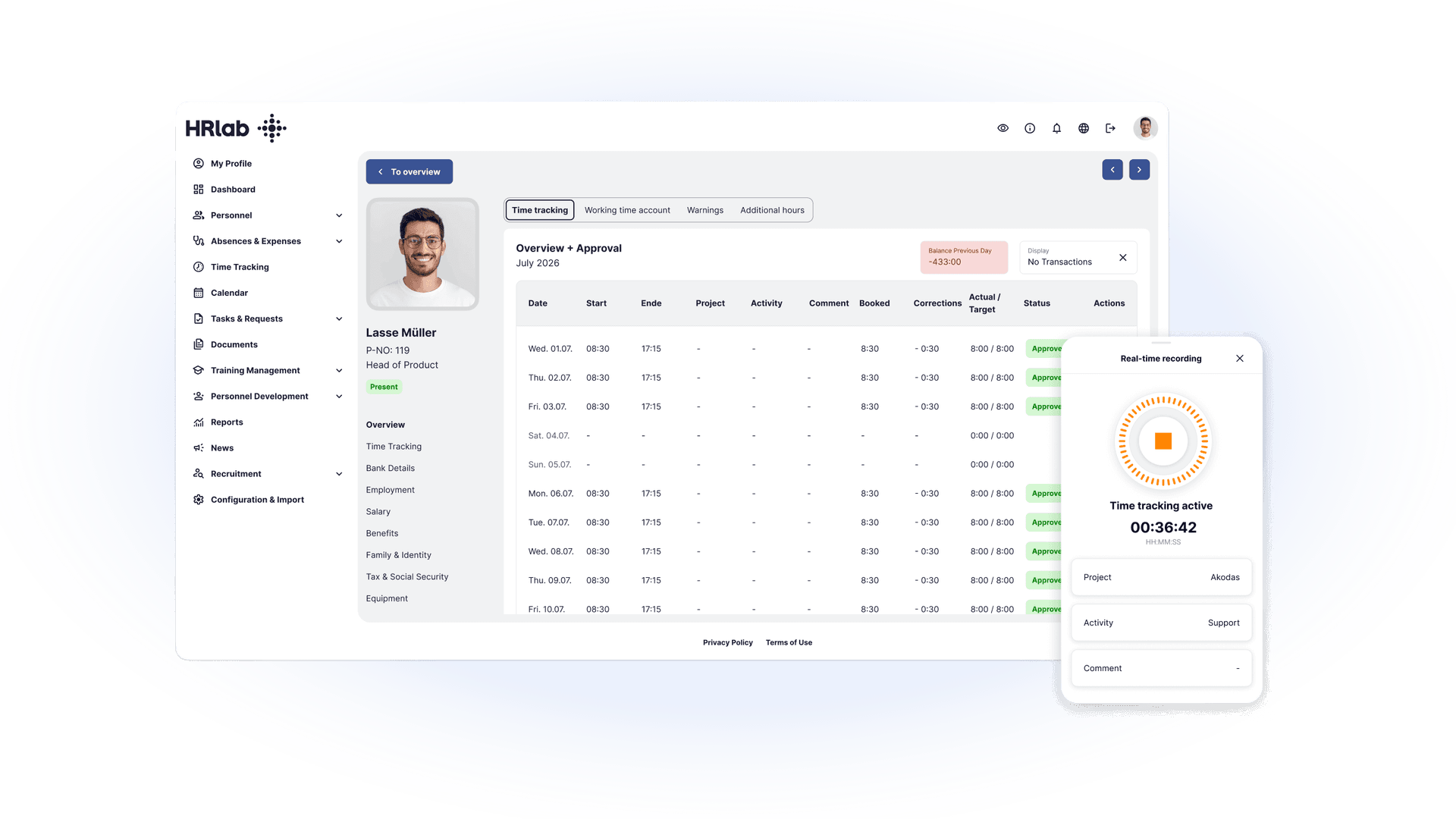
Tip: take a holistic approach
Instead of a standalone time tracking solution, it often pays to introduce a complete HR software right away. Comparing tools takes the same effort, and you’ll need a requirements specification anyway. This way, you can gradually digitalise or simplify all your other HR processes alongside time tracking. Modern time tracking systems only reach their full potential when they’re fully integrated with HR software. That turns a simple tracking tool into a central management tool for HR.
Benefits of integration
- Automated payroll: Recorded times feed directly into payroll preparation. Bonuses, overtime and absences are applied automatically.
- Transparency for managers and employees: Managers can access working time data in real time. Employees can view their working time accounts at any time through an employee self-service (ESS) portal.
- Legal compliance: Legal requirements for time tracking (e.g. rulings by the CJEU and the Federal Labour Court) are easier to meet, with audit-proof records.
- Project and cost control: Time can be assigned directly to projects, departments or clients, making budget planning and post-calculation easier.
- Better workforce planning: Working time data forms the basis for shift planning, capacity planning and forecasts.
- Single source of truth: All relevant employee information (master data, contracts, hours, absences) sits in one system, which reduces duplicate entries and errors.
Before we introduced HRlab, time tracking correction slips used to pile up on my desk. That has changed completely. Time tracking now runs fully automatically and reliably.
What time tracking systems cost
The cost of a time tracking system depends largely on the type of system, its features and the implementation requirements. It’s usually made up of one-off implementation costs and ongoing usage costs.
Paper timesheets or Excel spreadsheets are the cheapest option, with no software or setup fees. However, they create a heavy administrative workload for the HR department, as working hours have to be maintained, transferred and frequently corrected by hand.
Terminals or time clocks cost more to buy but significantly reduce manual work. In addition to the hardware, there are usually software licence fees and technical infrastructure costs.
Fingerprint scanners increase the investment further. Besides the hardware, they require data protection measures and dedicated resources to manage biometric data securely.
Digital time tracking systems / online solutions offer the best value for money. With HRlab, for example, you can choose between monthly and annual billing. You pay per employee per month or year, so the cost per person falls as your headcount grows. At the same time, you benefit from real-time tracking, automated payroll and flexible use from anywhere.
Good to know: Introducing new software takes time and planning. There are implementation costs, plus the one-off effort of digitising existing employee data. The long-term benefits clearly outweigh these costs.
Works agreements on time tracking systems
The works council (Betriebsrat) has no right of initiative when it comes to introducing a time tracking system, but it does have extensive co-determination rights under Section 87(1) No. 6 of the German Works Constitution Act (Betriebsverfassungsgesetz, BetrVG). This means the works council must be actively involved in selecting, introducing and designing a time tracking system, especially when personal data is collected or processed.
Companies should therefore conclude a works agreement (Betriebsvereinbarung) on time tracking together with the works council. This creates transparency, data security and legal certainty for everyone involved.
A works agreement of this kind should cover in particular:
- How working hours are recorded (e.g. digitally, via mobile or by terminal)
- Which data is stored and processed
- How long the data is retained
- Who has access to the recorded data, and to what extent
- For what purpose the data is collected and used